


Microsoft 365 E7 pricing, features, availability and benefits for Businesses.
Microsoft just introduced its most comprehensive productivity and security suite to date (Microsoft 365 E7, also known as the Frontier Suite) with general availability on May 1, 2026. If you’ve been following Microsoft’s AI roadmap, this is the product that formalizes where they’ve been heading for the past two years: a fully integrated platform that connects productivity, security, identity, and AI governance into a single license.
This post breaks down what E7 is, who it’s for, and the real question your organization should be asking before your next renewal.
Table of contents
What Is Microsoft 365 E7?
E7 is not simply “E5 with Copilot added.” It’s a fundamentally different offering built around the idea that AI, specifically AI agents, is no longer a future consideration for most enterprises. It’s happening now, often in ways IT departments can’t fully see or control.
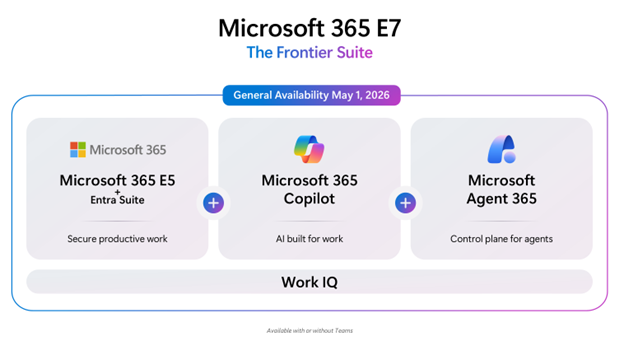
The suite brings together four solution areas:
Microsoft 365 E5 forms the foundation. If your organization is still on E3, E5 represents a substantial jump in security posture, compliance capability, and voice infrastructure. E7 starts there.
Microsoft Entra Suite delivers unified identity and access management for a world where users, devices, and now AI agents all need secure, governed access to your systems. It covers four key areas: Microsoft Entra Verified ID (digital identity verification), Entra Internet Access (secure, identity-aware access to internet and SaaS apps), Entra Private Access (a Zero Trust replacement for legacy VPN), and Entra ID Governance (automating the lifecycle of user and guest access across your environment). For organizations managing a distributed workforce, hybrid infrastructure, or expanding their use of AI, Entra Suite is what keeps your identity and access posture from becoming a liability as complexity grows.
Microsoft 365 Copilot integrates AI assistance directly into Word, Excel, PowerPoint, Outlook, Teams, and more. This is the same Copilot that has been available as a standalone add-on, now included as a core part of the license.
Microsoft Agent 365 is the newest and most consequential piece. Agent 365 is a centralized control plane that allows IT teams to discover, govern, approve, and manage AI agents (both Microsoft-built and third-party) across the entire organization from a single interface.
Why Agent 365 Changes the Conversation
Agent 365 is a brand-new product launching alongside E7 on May 1, 2026. It’s also available as a standalone license at $15/user/month for organizations not ready for the full E7 bundle.
For many of our customers, the concept of “AI agents” still feels abstract. Here’s the practical reality: agents are automated workflows that take action on behalf of your users (summarizing content, routing requests, drafting communications, triaging tickets) without requiring a human to initiate every step.
IDC projects agent use will increase by an order of magnitude over the next few years, with hundreds of millions, and eventually billions of agents operating across enterprises. That scale creates a real dilemma for IT and security leaders.
What’s already happening in many organizations is that individual teams are spinning up agents independently, often through tools like Copilot Studio, Power Automate, or third-party platforms, without IT having visibility into what those agents can access or how they behave. This creates genuine compliance and security exposure.
Agent 365 is the control plane built for exactly this problem. Rather than requiring organizations to rebuild their infrastructure or learn new management paradigms, it extends the same processes (already used to manage employees) to agents. IT teams get a single place inside the Microsoft Admin Center to observe, govern, and secure every agent in the environment.
Microsoft Security solutions like Defender, Entra, and Purview handle agent security and governance using familiar tools your team already knows. The idea is straightforward: you shouldn’t need to reinvent the wheel to get agents under control.
Is Microsoft 365 E7 the Right Move Financially?
The honest answer is: it depends on where you are today.
E7 is priced at $99/user/month (annual commitment). To put that in context, assembling the components separately (with E5 at $60, Copilot at $30, Entra Suite at $12, and the new Agent 365 at $15) would run $117/user/month at current list prices. That’s roughly 15% savings versus buying the components individually, making E7 a genuinely compelling consolidation play for organizations that need all four pieces.
For organizations already running E5 and Copilot who are beginning to explore or deploy agents, E7 is likely the most cost-effective path forward, particularly when you factor in the operational overhead of managing multiple separate licenses and renewal dates.
For organizations on E3, E7 represents a significant capability jump across security, AI, and identity all at once. The question isn’t whether E7 is valuable. It’s whether it makes sense to take that full step now or approach it in phases based on your adoption readiness and budget.
For organizations earlier in their AI journey, E7 may be getting ahead of where your teams are operationally. That doesn’t mean ignoring it, rather understanding the roadmap so you’re positioned to move at the right time.
The July 2026 Pricing Factor
What Should You Do Now?
You don’t need to make any decisions today. But the organizations that will be best positioned heading into the second half of 2026 are the ones taking a clear-eyed look at their current licensing, their actual usage, and what the next 12–18 months of their AI roadmap looks like, before a renewal forces a rushed decision.
Questions Worth Asking Now:
- What are we licensed for today, and what are we actually using?
- Where does AI fit into our operational plans for the next year?
- Does our current security and identity posture match where our environment is heading?
- How does our renewal timing interact with the July price changes?
Additional Resources
- Managed Solution – Microsoft’s New AI Product Suite
- Microsoft – The Frontier Suite